FLEDIT is everything
an editor needs
All in one place. Start editing faster and better.
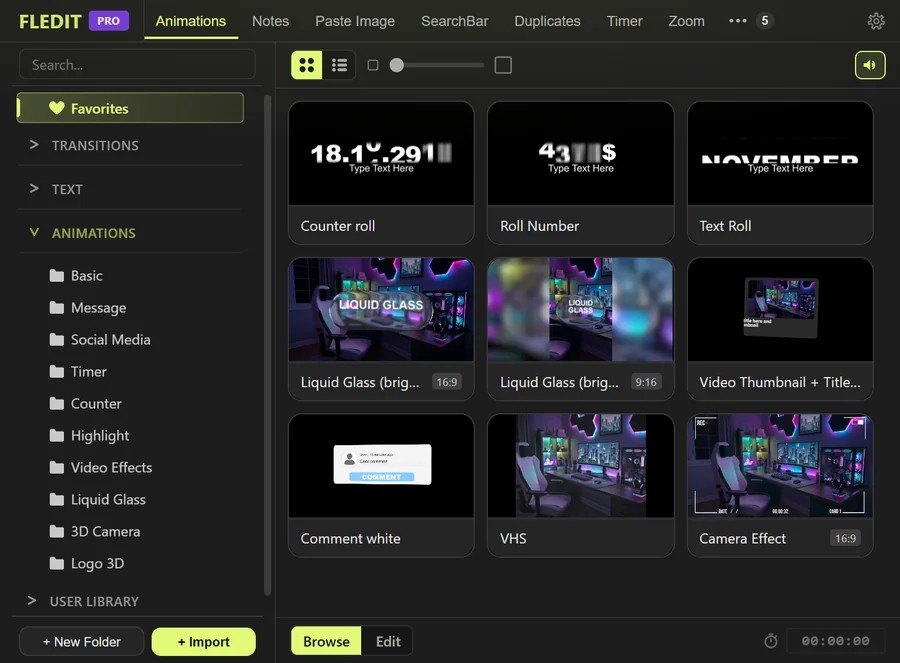
Create beautiful captions in no time!
Everything your captions need: transcription, layout, animation and MOGRTs. Without leaving Premiere Pro.
{{ v2.text.desc }}
More in Help →Less clicking, more editing
Tools that do the repetitive work for you on every edit. You focus on the cut.
{{ v2.workflow.it.lib.desc }}
More in Help →{{ v2.workflow.desc }}
More in Help →Animate more easily in Premiere
Tracking, zooms and keyframes with curves just like in After Effects, all without leaving Premiere Pro.
{{ v2.animator.it.zoom.desc }}
More in Help →{{ v2.animator.desc }}
More in Help →Just how much FLEDIT can do
What editors say
Over 800 people use FLEDIT

Edited by Dawid6 selected videosShow the listHide the list
- 21 DNI W DZIKIEJ W AFRYCEEditingFriz12.1M2022
- PONAD 15 LAT TWORZYŁEM TEN FILM...EditingFriz2.2M2024
- ZROBISZ TO W 10 SEKUND = WYGRYWASZ $$$Concept, shooting and editingprzemek pro1.5M2023
- POŚCIG ZA ZŁODZIEJAMIEditingprzemek pro1.3M2024
- WIELKI POWRÓT TRZECH KRÓLI!!!Editingprzemek pro819K2024
- QRY BEZ CENZURYConcept, shooting and editingQRY416K2024
Click a title to watch the video on YouTube. Views as of October 6, 2026.
- One pluginAnimations, Text Animate, tracking and much more in one panel inside Premiere Pro.
- Built for speedPerformance has been the main goal since the first version.
- Saves timeStop repeating the same steps on every edit.
- Best pricePay once and get tools worth about $500 at the best price!
Pick what you need. Or get everything.
Pay once. No subscription.
Free
Commercial use
- Animations and transitions, editing and your own presets
- User Library up to 300 files
- SearchBar: effects and transitions
- Text to MOGRT: 3 styles
- Paste Image
Pro
Most popularAll features · 2 computers · commercial use · no subscription
Includes
- TEXTCaptions for Reels, transcription, MOGRTs
- WORKFLOWPresets, shortcuts, macros, Cut Silence, Timer
- ANIMATORZoom, Tracker, keyframe curves
$48 less than buying the same features separately
Choose features
1 computer · commercial use · no subscription
Add more features later, whenever you need them.
Studio: Pro for teams
FLEDIT Pro for the whole team. Minimum 5 seats. One seat costs $119.20 plus tax and covers 1 person on 1 computer. Choose the number of seats and the whole team gets one key.
Total5 × $119.20$596Taxes calculated at checkout
Up to 200 seats in one purchase.
A separate key for each person? Write to support@fledit.com
- No subscriptionFeatures, Pro and Studio are a one-time purchase
- Perpetual licenseIt does not expire or need renewing
- 14 days for a refundRequest it within 14 days of purchase
- Free plan to startTry FLEDIT before you pay
Pro has all features and works on 2 computers.
| Feature | Free | Paid | Pro |
|---|---|---|---|
| 01TEXT | $59 | ||
| Reels Captions: transcription, layout and animated captions | - | ✓ | ✓ |
| Keywords in their own color and size | - | ✓ | ✓ |
| Pictures, GIFs and videos in the captions | - | ✓ | ✓ |
| Manual Animations: 90+ animations and Random | - | ✓ | ✓ |
| Ease In / Out curves | - | ✓ | ✓ |
| Text to MOGRT | 3 styles | Every style | Every style |
| Transcription in Text to MOGRT | - | ✓ | ✓ |
| Transcribe: 100 languages, offline, no limit | - | ✓ | ✓ |
| Word censoring in the captions | - | ✓ | ✓ |
| 02WORKFLOW | $79 | ||
| Built-in animations and transitions | ✓ | ✓ | ✓ |
| Editing animations and your own animation presets | ✓ | ✓ | ✓ |
| User Library: your own MOGRTs and files | ✓ | ✓ | ✓ |
| User Library size | 300 files | Unlimited | Unlimited |
| Sequence import from .prproj projects | - | ✓ | ✓ |
| ON TIMELINE status for media | - | ✓ | ✓ |
| Paste Image | ✓ | ✓ | ✓ |
| SearchBar: video and audio effects and transitions | ✓ | ✓ | ✓ |
| SearchBar: presets | - | ✓ | ✓ |
| SearchBar: extended scripts and functions in “Clip” | - | ✓ | ✓ |
| SearchBar: FLEDIT animations, MOGRTs and media | - | ✓ | ✓ |
| Favorites | - | ✓ | ✓ |
| Effects, presets, Clip functions and macros on a key | - | ✓ | ✓ |
| Shortcut import and export | - | ✓ | ✓ |
| Macros: create, import and export (.fleditmacro), community macros | - | ✓ | ✓ |
| Cut Silence | - | ✓ | ✓ |
| Auto Censor | - | ✓ | ✓ |
| Timer: work time, detects the active Adobe app | - | ✓ | ✓ |
| Timer: clients, earnings, reports, streamer mode | - | ✓ | ✓ |
| Notes | - | ✓ | ✓ |
| Duplicates | - | ✓ | ✓ |
| 03ANIMATOR | $59 | ||
| Zoom and Infinity Zoom | - | ✓ | ✓ |
| Auto SFX: your own sounds added to zooms | - | ✓ | ✓ |
| Tracker: Stabilize, Track Motion, 3D Tracker | - | ✓ | ✓ |
| Ease Keyframes | - | ✓ | ✓ |
| Anchor Control | - | ✓ | ✓ |
| Motion to Transform | - | ✓ | ✓ |
| General | |||
| Windows & macOS | ✓ | ✓ | ✓ |
| Updates | ✓ | ✓ | ✓ |
| Commercial use | ✓ | ✓ | ✓ |
| Computers | - | 1 | 2 |
Prices in USD. Taxes are calculated at checkout. Companies with a valid EU VAT number pay no VAT.